
October 13, 2026
Adding 4 Point Hermite Interpolation
A small addition to Step 3: window shapes and interpolation.
An audio file stores amplitude values at whole-number sample positions. But a grain might need to read at 11.5, halfway between samples 11 and 12. Fractional starting positions and changed playback speeds can both require reads between stored samples.
Interpolation estimates the amplitude at that missing position. Drizel now has a four-point Hermite option alongside linear interpolation in its core reader API.
From a straight line to a curve
Linear interpolation connects two neighboring samples with a straight line. Halfway between them, the result is their ordinary average; at other positions, it is a weighted average.
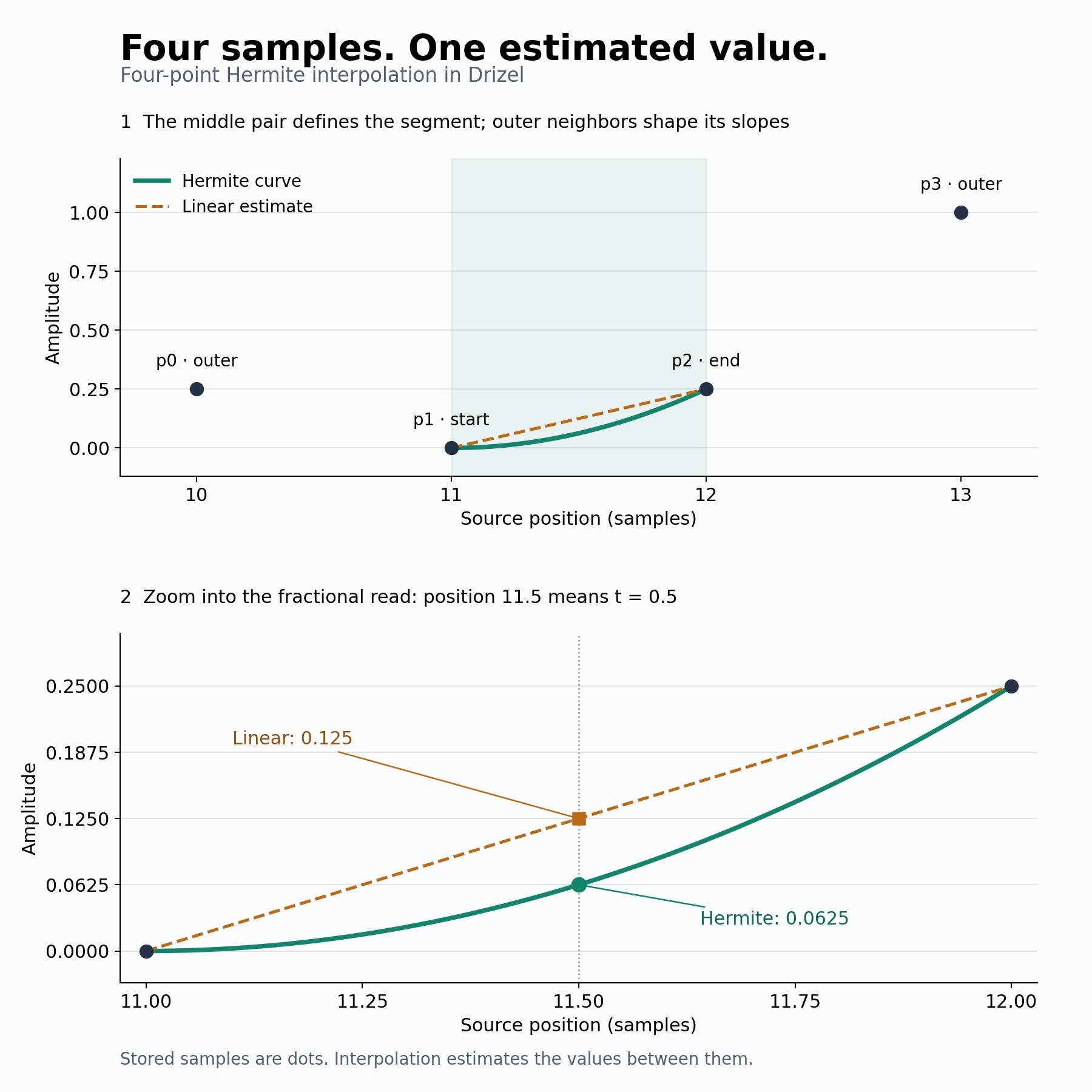
Four-point Hermite interpolation uses two samples around the read position and one extra neighbor on each side. Those outer samples help estimate the direction, or slope, of the curve at its ends.
What do the four points do?
| Point | Source position | Amplitude | Role |
|---|---|---|---|
| p0 | 10 | 0.25 | Helps estimate the starting slope |
| p1 | 11 | 0.00 | Start of the segment being read |
| p2 | 12 | 0.25 | End of the segment being read |
| p3 | 13 | 1.00 | Helps estimate the ending slope |
Drizel uses the Catmull–Rom form of cubic Hermite interpolation, with slopes measured in amplitude per source sample:
- Starting slope:
(p2 − p0) / 2 - Ending slope:
(p3 − p1) / 2
For the values above, those slopes are 0 and 0.5. The curve starts flat, then rises more steeply toward p2. At position 11.5, the fractional offset t is 0.5:
- Linear: 0.125
- Hermite: 0.0625
Hermite is more than averaging four samples: their positions and the fractional offset determine the curve.
Why add it to a granular synth?
Linear interpolation can reduce high-frequency level, with the amount depending on the fractional offset. If grain starts are jittered by fractional samples, that can also vary their brightness. Hermite often preserves more high-frequency detail, making it useful for comparison on bright source material.
It also takes more work per read and can overshoot the surrounding sample values. Hermite remains an approximation; it does not replace the filtering needed to prevent aliasing during resampling.
Where the window fits
Interpolation and windowing are separate operations in the planned grain voice:
- Choose a source position: decide where this grain reads.
- Interpolate: estimate the source amplitude at that position.
- Apply the window: fade that amplitude according to the grain's age.
- Mix: add the grain's contribution to the output.
For example, a Hermite read of 0.0625, multiplied by a window value of 0.5, contributes 0.03125 before any additional gain or pan. Overlapping grains contribute their own values to the sum.
What changed in Drizel
The feature branch adds readHermite(), an InterpolationMode choice, and readSample() to dispatch between methods. Linear interpolation remains the default. Tests cover reconstruction, integer reads, boundaries, invalid inputs, and mode selection.
This is a core DSP addition. Grain playback in the plugin and a UI selector still need to be connected. View the implementation in neuralmanacle/drizel#3
Takeaway: interpolation estimates what to read between samples; windowing shapes how that read contributes over the grain's lifetime.